Net Position Report (Commodity)

What is Net Position?
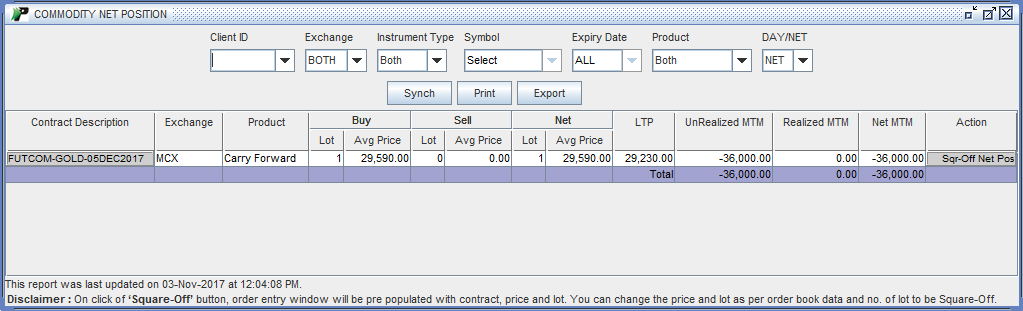
Net position provides details about total long position, total short position and net position you hold in specific contract in commodity Segment. You can access this report by clicking the Net Position link in Commodity Trading Menu.
 |
How to filter records?
PIB provides you with several options to filter records. These options are available on the top area of the window.
- Exchange – You can specify whether you want to search for MCX orders or NCDEX orders. To search orders for both, choose ‘Both’ option.
- Instrument Type- Next, choose the
Instrument type. Here, you are provided with two major instrument types – OPTFUT and FUTCOM. To search for both, choose ‘Both’ option.
- Symbol- You can view the orders on the basis of symbol. You can select the symbol for which you wish to view your commodity orders.
- Product- You can specify whether you want to search for Intraday Orders or Carry Forward Orders. To search for both, choose ‘Both’ option.
- Day/Net – You can specify whether you want to search for positions taken on current day or complete position. To view Current day position, choose ‘DAY’ option and to view complete position, choose ‘NET’ option.
Here, you can view your contract wise position including following details:
- Contract Description – It displays the full description of the contract including commodity symbol, contract type and Expiry date for future contracts and symbol, contract type,Expiry date,strike price and option type for option contract.
- Exchange – It displays the exchange for the corresponding position.
- Product – It display the product for the corresponding position. If the order is placed in intraday product, PIB displays ‘Intraday’ in this field. If the order is placed in Carry forward product, PIB displays ‘Carry Forward’ in this field.
- Buy Lot - It displays total lots purchased by you in selected contract.
- Buy Avg Price – It displays the Buy Avg Price of the long positions (in lots) you hold in selected contract.
- Sell Lot - It displays total lots sold by you in selected contract.
- Sell Avg Price - It displays the Sell Avg Price of the short positions (in lots) you hold in selected contract.
- Net Lot - It displays the net lot available in your account for selected contract. It is the difference between Buy Quantity - Sell Quantity.
- Net Avg Price - It displays the Net Avg Price of the net positions (in lots) you hold in selected contract.
- Unrealized MTM - It displays the unrealized Profit / Loss in the given contract.
- Realized MTM - It displays the booked Profit / Loss in the given contract.
- Net MTM - It displays sum of realized and unrealized MTM for given contract.
Add-on Features
- Print - You can take a print out of your Current Obligation Report by clicking on ‘Print’ button.
- Export - You can download the given details in your PC by clicking on ‘Export’ button. These details will be downloaded in CSV format.
- Synch - You can click on ‘Synch’ button to synchronize /update Current Obligation Report.